Video Copies: What quality can I expect?
In computing there is an expression that refers to writing instructions to the computer. The rule is "Garbage In, Garbage Out." In other words, if the source of your instructions to the computer is not absolutely first rate, the performance of the computer will reflect this.
GIGO applies to video as well. Poor quality video originals result in poor quality copies.
Good video copies depend on good original tape footage. The Video Tips portion of this web site gives lots of suggestions which will help you become a better video producer.
There will always be a slight generational loss, and some slight bleeding, but if the original tape is good, the copies should be perfectly acceptable.
"Generational Loss"
Copying the original video is said to be "going down a generation." That is, the copy is one generation removed from the original. The copy of a copy is two generations down. Every generation down means somewhat less sharpness and clarity (resolution) in the images.
For example, if you shoot video of your trip to the Grand Canyon, bring it home and try to edit it on your VCR, then bring it to VideOccasions to be copied, we're making you a third generation tape, and it will have less sharpness to it than the original. The analogy might be to tracing a picture: the tracing of a tracing would be considerably less sharp than the original.
"Bleeding"
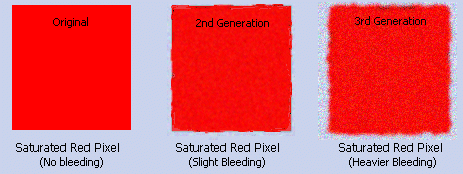
In addition to loss of sharpness (resolution), generational loss leads to "bleeding" of colors, especially saturated reds and blues. Another name for bleeding is "flare." In a greatly exaggerated example, this is what "bleeding" looks like.
Minimizing Generational Loss
So does this mean that you shouldn't make a copy of your video? Not at all. But it does mean you should do it on professional equipment, and that you should attempt to work from the original tape as much as possible.
To get good copies of video tapes --
- Bring us the original, the first generation tape, from which to make your copies.
- Talk to us at VideOccasions before you try to edit your tapes, so that both you and we understand what you're trying to do, and what you want as the finished result. Planning is easy and inexpensive. Fixing is difficult and costly.
- If you're going to edit, do it on first rate professional equipment, so that the second generation tape from which we make your copies is as good as possible.
Digital Copying
Sometimes it is important to minimize image loss in the copying process. Should this be the case, consider having us transfer the original to a digital format, a miniDV tape, then copying the digital file to tape. This will increase the cost by a few dollars, but will keep the image quality high. Call (425-641-4811) to discuss this option.
Last updated 8/15/05
© 2005 VideOccasions and Jack Wolcott
Designed for VideOccasions by Jack Wolcott

